
Blog · Security & GDPR
Areas per department and a department lead
For each department you decide which areas the team sees, and you name a department lead with extended rights. Support sees no sales.
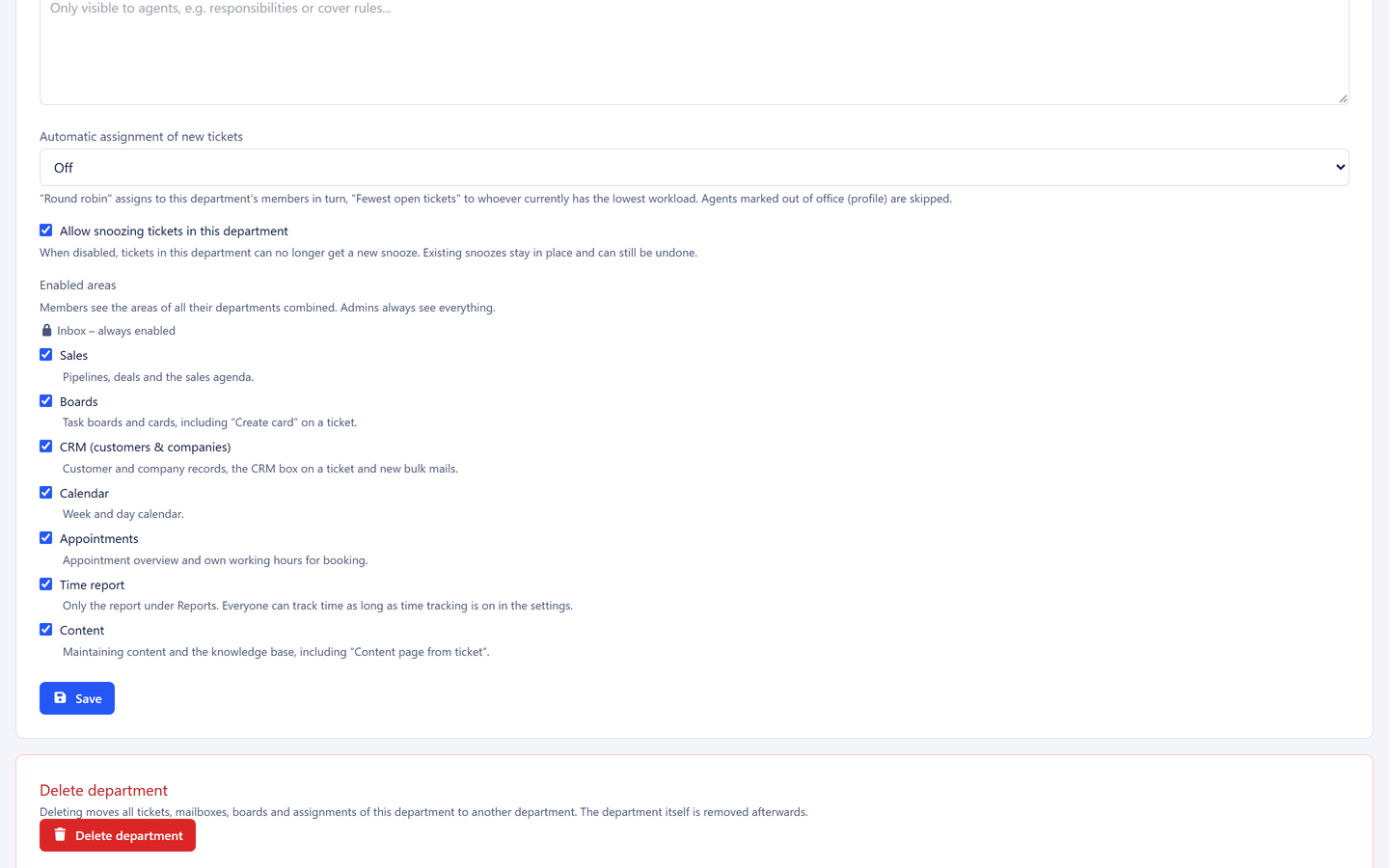
5sDesk now has finer access control. For each department you decide which areas the team sees at all, and you name a department lead with extended rights. Support no longer sees sales, deleting is reserved for the lead, and administration keeps the full picture as before. How the permissions fit together overall is explained on the Security & GDPR page.
Areas per department
For each department you switch on individually what its members use:
- Sales (pipelines, deals, sales tasks)
- Boards (tasks and cards)
- CRM (customer and company records)
- Calendar
- Appointments
- Time reporting
- Content and knowledge base
The inbox is always included; it is the heart of 5sDesk. Anyone who works in several departments gets the areas of all their departments combined. Anything not switched on disappears from the menu and cannot be reached via the address bar either.
Department lead
For each department you decide who leads it. Within their department, a lead may do more than their colleagues:
- permanently delete archived cards
- create, rename, sort and remove board columns
- delete customers and companies
- view the reporting for their own department
- open the dashboard, calendar and tracked time of their own team
The lead only sees what belongs to their department. If a team member also works in another department, that department’s tickets stay invisible to the lead. Settings and user management remain the job of administration.
What this improves in practice
Less distraction, a clearer interface. A service team that never works with deals sees no pipelines either. The menu shows only what matters for your own work.
Protection against accidental deletion. Deleting customers and companies is now decided by the lead or by administration. One click too many no longer costs a customer history.
Responsibility where it belongs. Team leads no longer have to call on administration for every column change or every deletion. They manage their own area without receiving rights for the whole organisation.
Reporting for those who need it. Reports used to be reserved for administration. Now every lead sees the figures for their own team: ticket volume, first response times, deals won.
Time tracking stays open to everyone. Everyone continues to track their time on tickets and cards. Only the reporting across people is protected, because that is personnel data.
Confidential stays confidential. The proven separation by department applies unchanged. The new rights never widen visibility; they only restrict actions or allow them deliberately.
Who this is especially interesting for
- Companies with separate support and sales: both teams work in the same inbox but see only their own tools.
- Growing teams: as soon as a department has its own lead, that person can organise their area themselves.
- Organisations with data protection requirements: deletion rights and personnel reporting sit transparently with a few roles.
At a glance
| What | Value |
|---|---|
| Switchable areas per department | 7 |
| Roles | Owner, administration, department lead, staff |
| Setup | Settings → Departments or Users |
You will find the settings under Administration → Settings → Departments; the lead is set per person in the user form. If you are not using 5sDesk yet, set up departments and areas right from the start: Start free trial.